library(tidyverse) # data wrangling and visualization
library(tidymodels) # modelingSpending your data
Lecture 21
Warm-up
While you wait: Participate 📱💻
Which of the following files should you be updating in your project between now and Thursday’s deadline? Check all that apply.
contract.qmdindex.qmd-
presentation.qmdorpresentation.pdf proposal.qmd-
README.mdin yourdatafolder

Scan the QR code or go to app.wooclap.com/sta199. Log in with your Duke NetID.
Announcements
Project write-ups due Thursday at 11:59pm
Peer evaluations due Friday at 11:59pm
From last week
Finish up ae-13-spam-filter.
Setup
Packages
Data
Taxi trips in Chicago, IL in 2022
Data from Chicago Data Portal
Data: chicago_taxi
chicago_taxi <- read_csv("data/chicago-taxi.csv")chicago_taxi# A tibble: 2,000 × 7
tip distance company local dow month hour
<chr> <dbl> <chr> <chr> <chr> <chr> <dbl>
1 no 0.4 other yes Fri Mar 17
2 no 0.96 Taxicab Insurance Agency Llc no Mon Apr 8
3 no 1.07 Sun Taxi no Fri Feb 15
4 no 1.13 other no Sat Feb 14
5 no 10.8 Sun Taxi no Sat Apr 14
6 no 3.6 Chicago Independents no Wed Mar 12
7 no 1.08 Flash Cab yes Wed Mar 13
8 no 0.85 Taxicab Insurance Agency Llc no Tue Mar 8
9 no 17.9 City Service no Tue Jan 20
10 no 0 City Service yes Sun Apr 16
# ℹ 1,990 more rowsData: chicago_taxi
glimpse(chicago_taxi)Rows: 2,000
Columns: 7
$ tip <chr> "no", "no", "no", "no", "no", "no", "no", "no", "no…
$ distance <dbl> 0.40, 0.96, 1.07, 1.13, 10.81, 3.60, 1.08, 0.85, 17…
$ company <chr> "other", "Taxicab Insurance Agency Llc", "Sun Taxi"…
$ local <chr> "yes", "no", "no", "no", "no", "no", "yes", "no", "…
$ dow <chr> "Fri", "Mon", "Fri", "Sat", "Sat", "Wed", "Wed", "T…
$ month <chr> "Mar", "Apr", "Feb", "Feb", "Apr", "Mar", "Mar", "M…
$ hour <dbl> 17, 8, 15, 14, 14, 12, 13, 8, 20, 16, 20, 8, 15, 15…Data prep
chicago_taxi <- chicago_taxi |>
  mutate(
    tip = fct_relevel(tip, "no", "yes"),
    local = fct_relevel(local, "no", "yes"),
    dow = fct_relevel(dow, "Mon", "Tue", "Wed", "Thu", "Fri", "Sat", "Sun"),
    month = fct_relevel(month, "Jan", "Feb", "Mar", "Apr")
  )
Outcome and predictors
- Outcome -
tip: Whether rider left a tip – a factor w/ levels “yes” and “no” - (Potential) predictors:
- Numerical:
-
distance: The trip distance, in odometer miles. -
hour: The hour of the day in which the trip began.
-
- Categorical:
-
company: The taxi company – companies that occurred few times were binned as “other”. -
local: Whether the trip started in the same community area as it began. -
dow: The day of the week in which the trip began. -
month: The month in which the trip began.
-
- Numerical:
Should we include a predictor?
To determine whether we should include a predictor in a model, we should start by asking:
Is it ethical to use this variable? (Or even legal?)
Will this variable be available at prediction time?
Does this variable contribute to explainability?
Data splitting and spending
We’ve been cheating!
So far, we’ve been using all the data we have for building models. In predictive contexts, this would be considered cheating.
Evaluating model performance for predicting outcomes that were used when building the models is like evaluating your learning with questions whose answers you’ve already seen.
Spending your data
For predictive models (used primarily in machine learning), we typically split data into training and test sets:
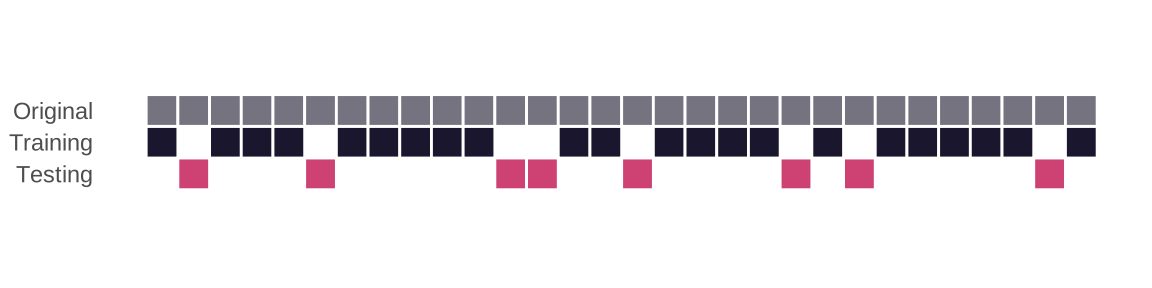
The training set is used to estimate model parameters.
The test set is used to find an independent assessment of model performance.
. . .
Warning
Do not use, or even peek at, the test set during training.
How much to spend?
The more data we spend (use in training), the better estimates we’ll get.
Spending too much data in training prevents us from computing a good assessment of predictive performance.
Spending too much data in testing prevents us from computing a good estimate of model parameters.
The initial split
set.seed(20251111)
chicago_taxi_split <- initial_split(chicago_taxi)
chicago_taxi_split
<Training/Testing/Total>
<1500/500/2000>Setting a seed
What does set.seed() do?
To create that split of the data, R generates “pseudo-random” numbers: while they are made to behave like random numbers, their generation is deterministic given a “seed”.
This allows us to reproduce results by setting that seed.
Which seed you pick doesn’t matter, as long as you don’t try a bunch of seeds and pick the one that gives you the best performance.
Accessing the data
chicago_taxi_train <- training(chicago_taxi_split)
chicago_taxi_test <- testing(chicago_taxi_split)
The training set
chicago_taxi_train# A tibble: 1,500 × 7
tip distance company local dow month hour
<fct> <dbl> <chr> <fct> <fct> <fct> <dbl>
1 no 7.9 Taxi Affiliation Services no Sat Apr 17
2 no 10.7 Sun Taxi no Fri Mar 9
3 yes 3.4 Taxi Affiliation Services no Thu Mar 20
4 no 4.7 Taxi Affiliation Services no Fri Jan 9
5 no 18.6 Taxicab Insurance Agency Llc no Fri Feb 15
6 yes 0.89 other yes Fri Mar 17
7 no 17.6 City Service no Wed Feb 19
8 no 0.97 Taxicab Insurance Agency Llc yes Thu Mar 21
9 no 0.4 other yes Fri Mar 17
10 yes 2.2 other no Wed Apr 10
# ℹ 1,490 more rowsThe testing data
. . .
🙈
Exploratory data analysis
Initial questions
What’s the distribution of the outcome,
tip?What’s the distribution of numeric variables like
distanceorhour?How does the distribution of
tipdiffer across the categorical and numerical variables?
While you wait: Participate 📱💻
Which dataset should we use for the exploration?
- The entire data
chicago_taxi - The training data
chicago_taxi_train - The testing data
chicago_taxi_test
Scan the QR code or go to app.wooclap.com/sta199. Log in with your Duke NetID.
tip
What’s the distribution of the outcome, tip?
distance
What’s the distribution of distance?
ggplot(chicago_taxi_train, aes(x = distance)) +
  geom_histogram(binwidth = 3)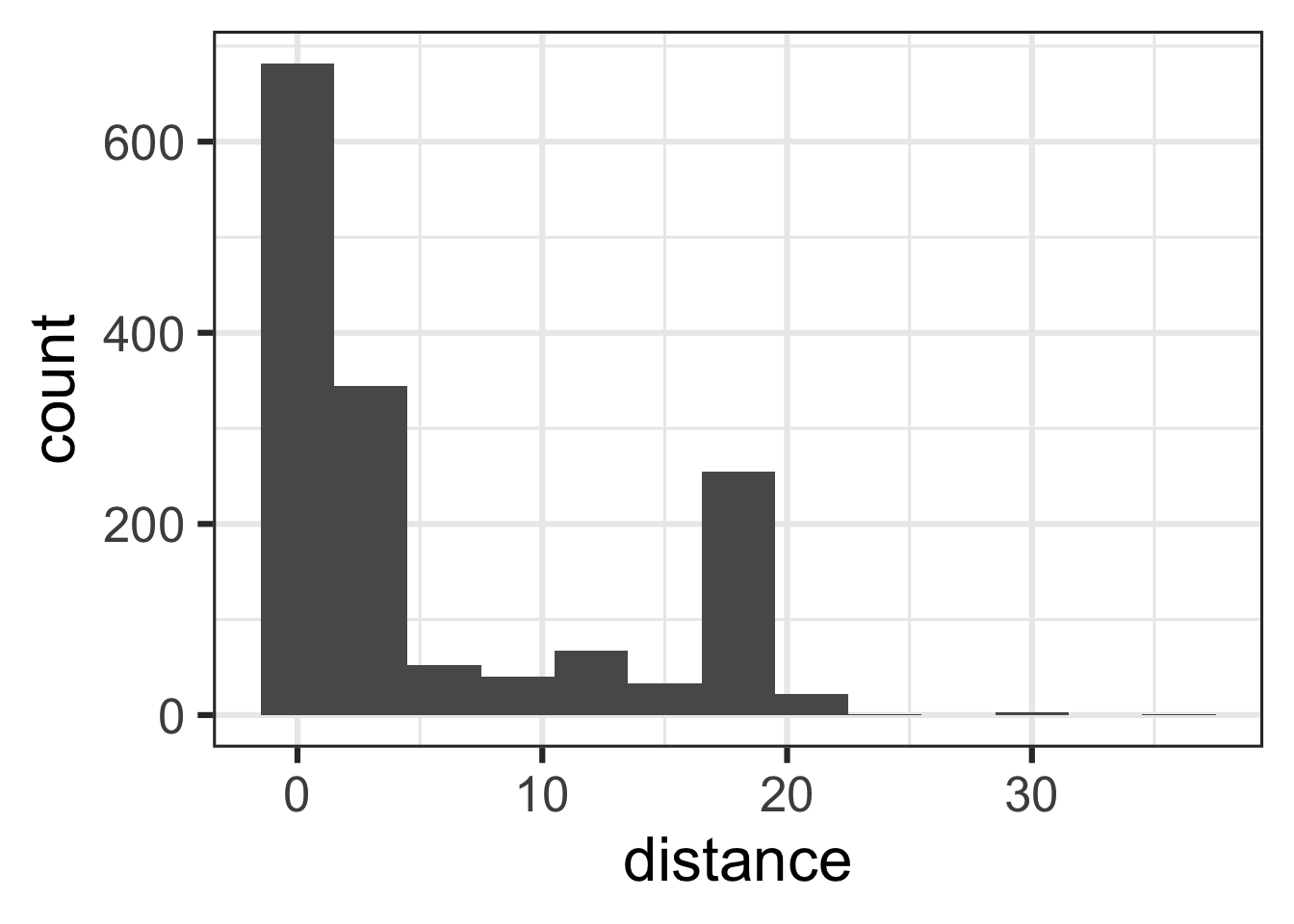
tip and distance
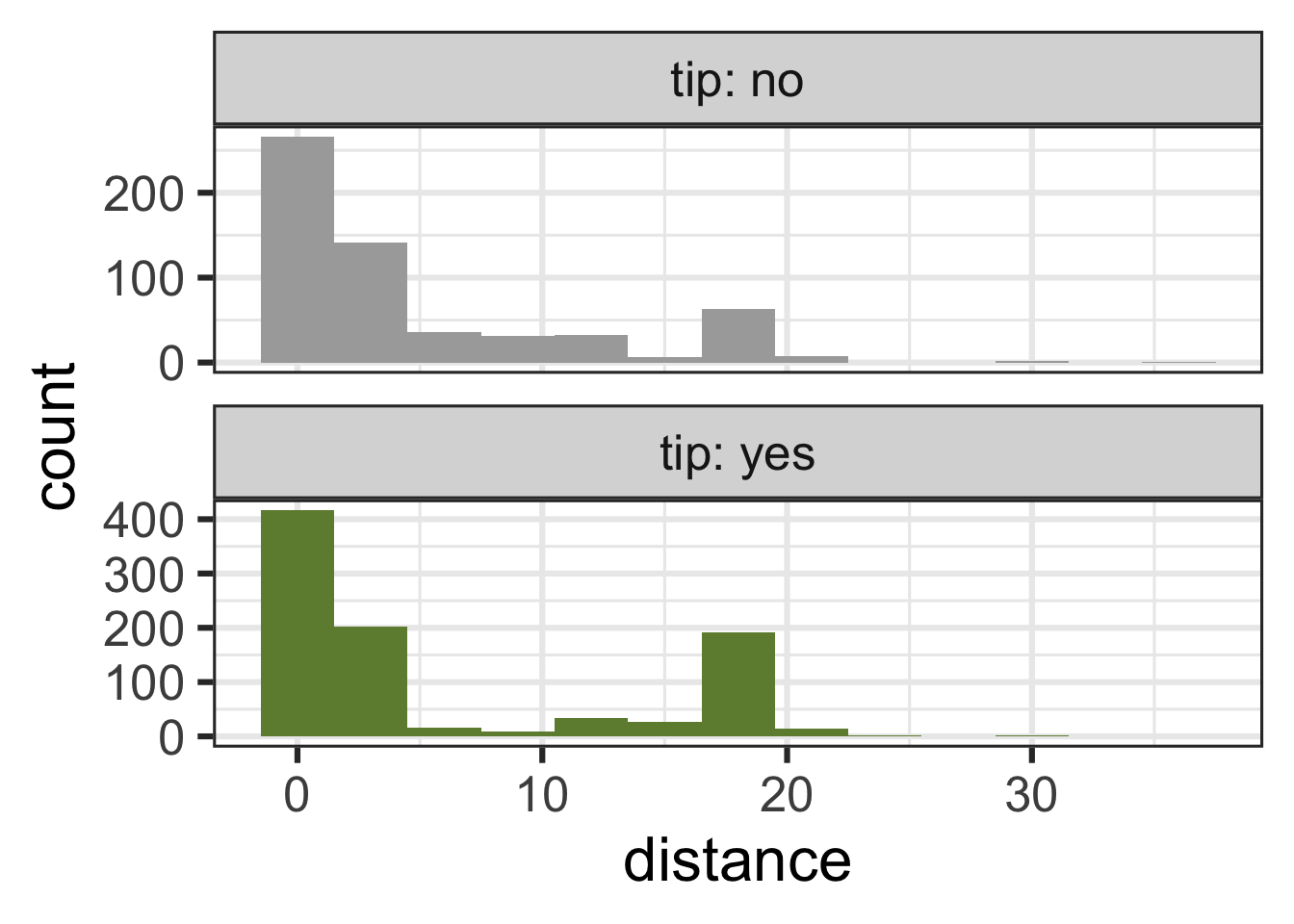
tip and hour
ggplot(chicago_taxi_train, aes(x = hour, fill = tip, group = tip)) +
  geom_histogram(binwidth = 1, show.legend = FALSE) +
  scale_fill_manual(values = c("yes" = "darkolivegreen4", "no" = "darkgray")) +
  scale_x_continuous(breaks = seq(0, 18, by = 6)) +
  facet_wrap(~tip, ncol = 1, labeller = label_both, scales = "free_y")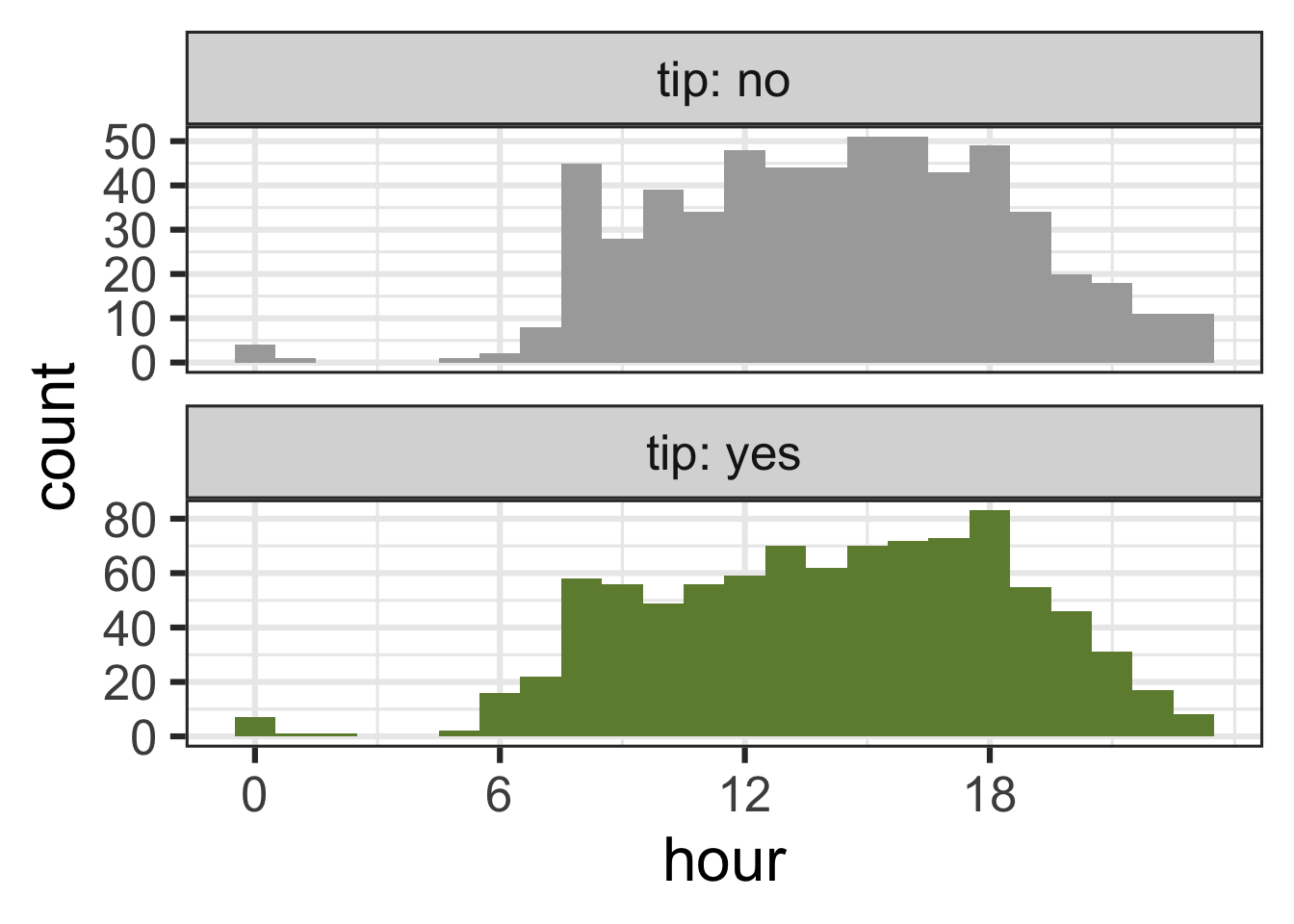
tip and local
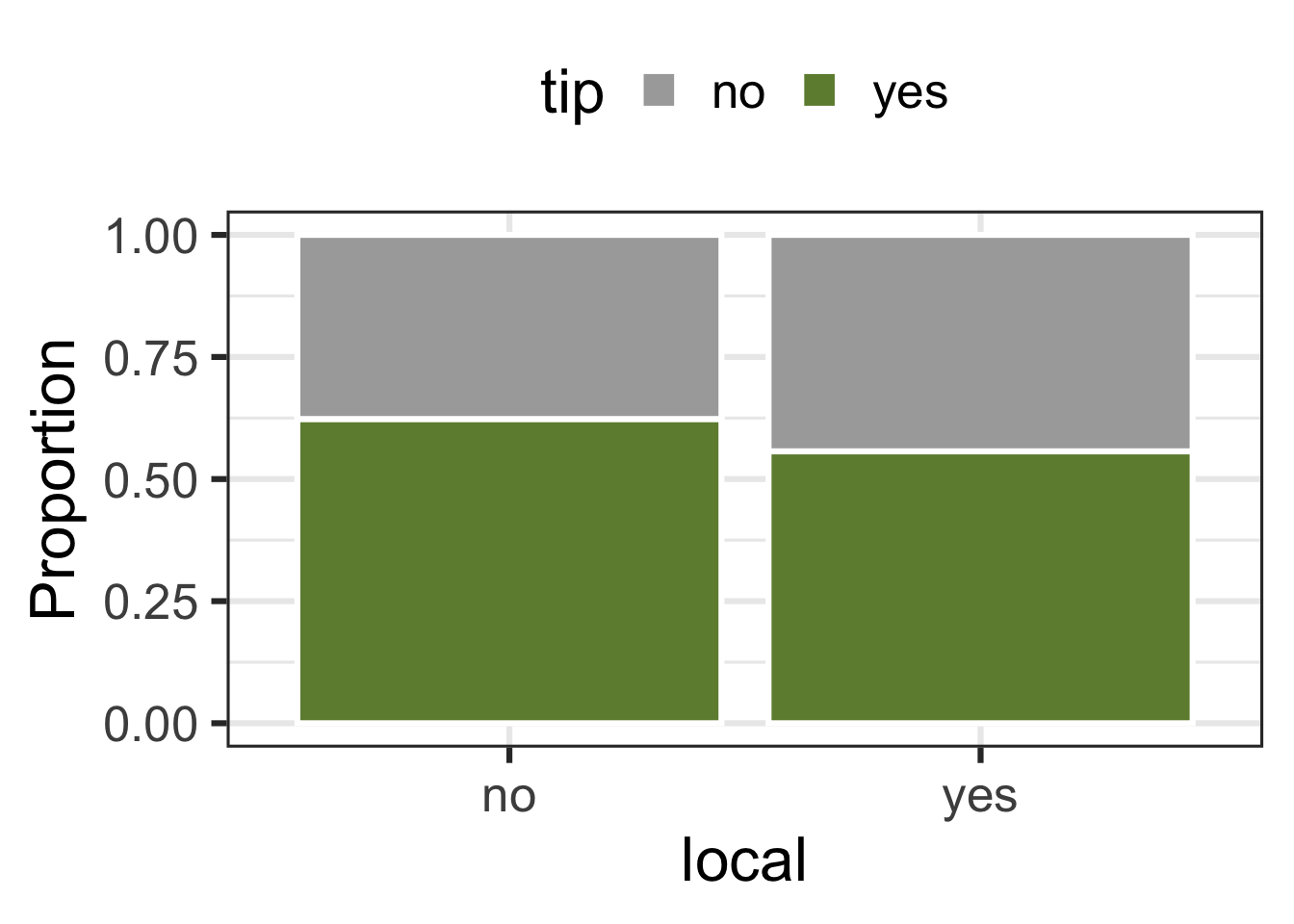
tip and dow
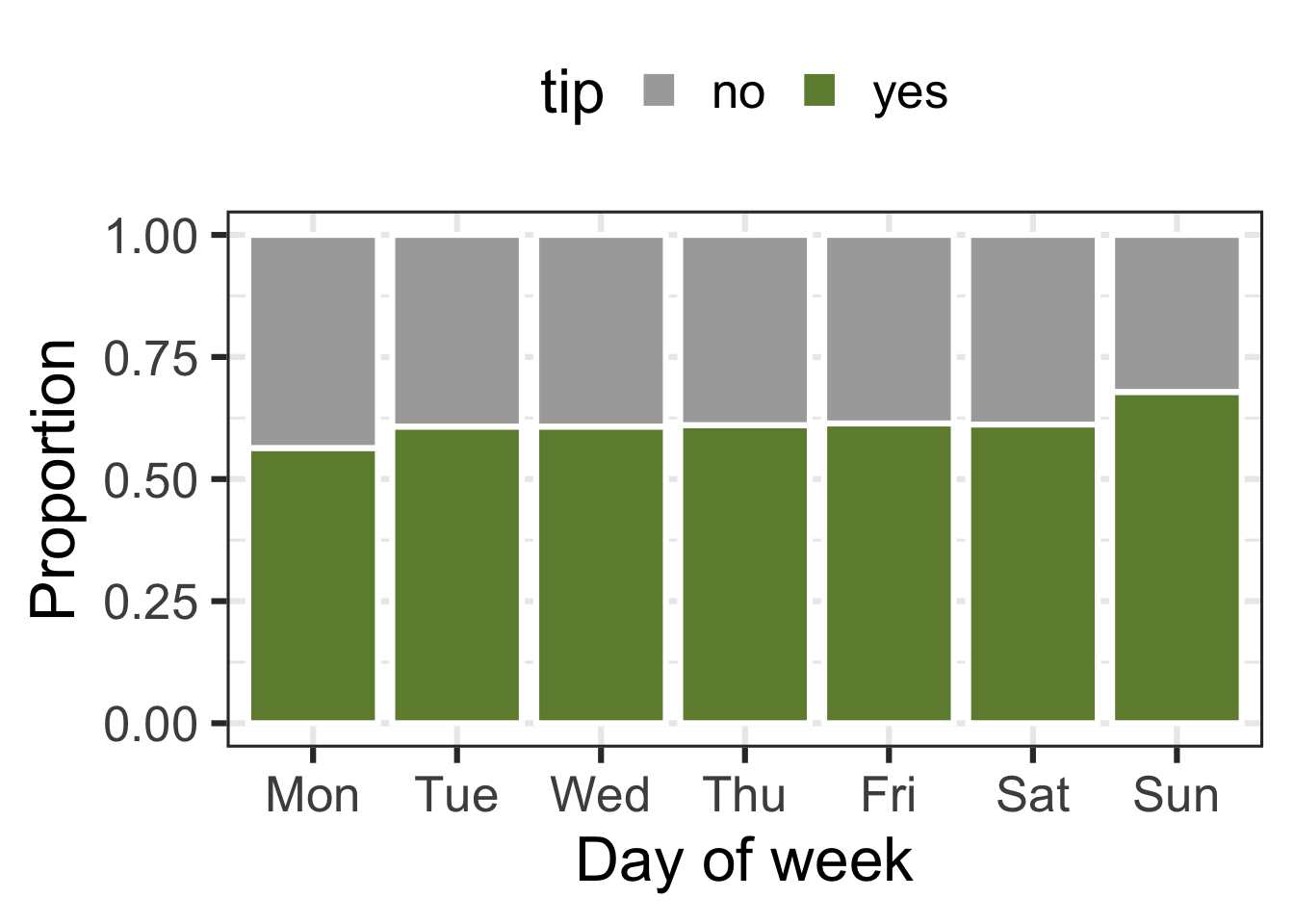
Terminology
False negative and positive
False negative rate is the proportion of actual positives that were classified as negatives.
False positive rate is the proportion of actual negatives that were classified as positives.
Sensitivity
Sensitivity is the proportion of actual positives that were correctly classified as positive.
Also known as true positive rate and recall
Sensitivity = 1 − False negative rate
Useful when false negatives are more “expensive” than false positives
Specificity
Specificity is the proportion of actual negatives that were correctly classified as negative
Also known as true negative rate
Specificity = 1 − False positive rate
ROC curve
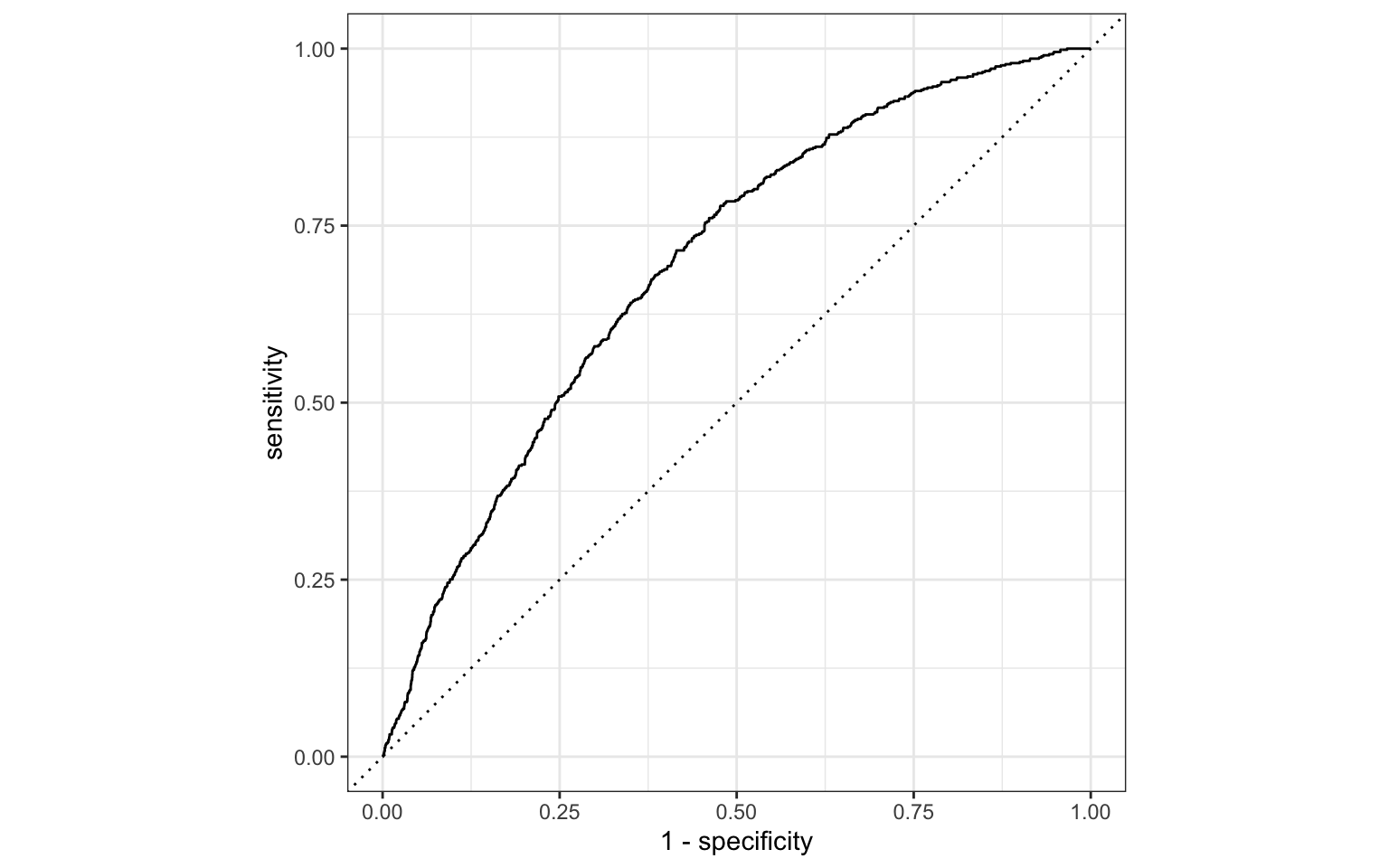
The receiver operating characteristic (ROC) curve allows to assess the model performance across a range of thresholds.
Participate 📱💻
Which of the following best describes the area annotated on the ROC curve?

- Where all positives classified as positive, all negatives classified as negative
- Where true positive rate = false positive rate
- Where all positives classified as negative, all negatives classified as positive
Scan the QR code or go to app.wooclap.com/sta199. Log in with your Duke NetID.