AE 15: Houses in Duke Forest
Suggested answers
These are suggested answers. This document should be used as reference only, it’s not designed to be an exhaustive key.
In this application exercise, we will use bootstrapping to construct confidence intervals.
Packages
We will use tidyverse and tidymodels for data exploration and modeling, respectively, and the openintro package for the data, and the knitr package for formatting tables.
Data
The data are on houses that were sold in the Duke Forest neighborhood of Durham, NC around November 2020. It was originally scraped from Zillow, and can be found in the duke_forest data set in the openintro R package.
glimpse(duke_forest)Rows: 98
Columns: 13
$ address <chr> "1 Learned Pl, Durham, NC 27705", "1616 Pinecrest Rd, Durha…
$ price <dbl> 1520000, 1030000, 420000, 680000, 428500, 456000, 1270000, …
$ bed <dbl> 3, 5, 2, 4, 4, 3, 5, 4, 4, 3, 4, 4, 3, 5, 4, 5, 3, 4, 4, 3,…
$ bath <dbl> 4.0, 4.0, 3.0, 3.0, 3.0, 3.0, 5.0, 3.0, 5.0, 2.0, 3.0, 3.0,…
$ area <dbl> 6040, 4475, 1745, 2091, 1772, 1950, 3909, 2841, 3924, 2173,…
$ type <chr> "Single Family", "Single Family", "Single Family", "Single …
$ year_built <dbl> 1972, 1969, 1959, 1961, 2020, 2014, 1968, 1973, 1972, 1964,…
$ heating <chr> "Other, Gas", "Forced air, Gas", "Forced air, Gas", "Heat p…
$ cooling <fct> central, central, central, central, central, central, centr…
$ parking <chr> "0 spaces", "Carport, Covered", "Garage - Attached, Covered…
$ lot <dbl> 0.97, 1.38, 0.51, 0.84, 0.16, 0.45, 0.94, 0.79, 0.53, 0.73,…
$ hoa <chr> NA, NA, NA, NA, NA, NA, NA, NA, NA, NA, NA, NA, NA, NA, NA,…
$ url <chr> "https://www.zillow.com/homedetails/1-Learned-Pl-Durham-NC-…Model
df_fit <- linear_reg() |>
  set_engine("lm") |>
  fit(price ~ area, data = duke_forest)

tidy(df_fit) |>
kable(digits = 2)| term | estimate | std.error | statistic | p.value |
|---|---|---|---|---|
| (Intercept) | 116652.33 | 53302.46 | 2.19 | 0.03 |
| area | 159.48 | 18.17 | 8.78 | 0.00 |
Bootstrap confidence interval
1. Calculate the observed fit (slope)
observed_fit <- duke_forest |>
  specify(price ~ area) |>
  fit()

observed_fit
# A tibble: 2 × 2
term estimate
<chr> <dbl>
1 intercept 116652.
2 area 159.2. Take n bootstrap samples and fit models to each one.
Fill in the code, then set eval: true .
n = 100
set.seed(20251125)

boot_fits <- duke_forest |>
  specify(price ~ area) |>
  generate(reps = n, type = "bootstrap") |>
  fit()

boot_fits
# A tibble: 200 × 3
# Groups: replicate [100]
replicate term estimate
<int> <chr> <dbl>
1 1 intercept 340808.
2 1 area 73.4
3 2 intercept 79713.
4 2 area 175.
5 3 intercept 85114.
6 3 area 183.
7 4 intercept 144051.
8 4 area 142.
9 5 intercept -55286.
10 5 area 227.
# ℹ 190 more rowsWhy do we set a seed before taking the bootstrap samples?
Make a histogram of the bootstrap samples to visualize the bootstrap distribution.
boot_fits |>
  filter(term == "area") |>
  ggplot(aes(x = estimate)) +
  geom_histogram()
`stat_bin()` using `bins = 30`. Pick better value `binwidth`.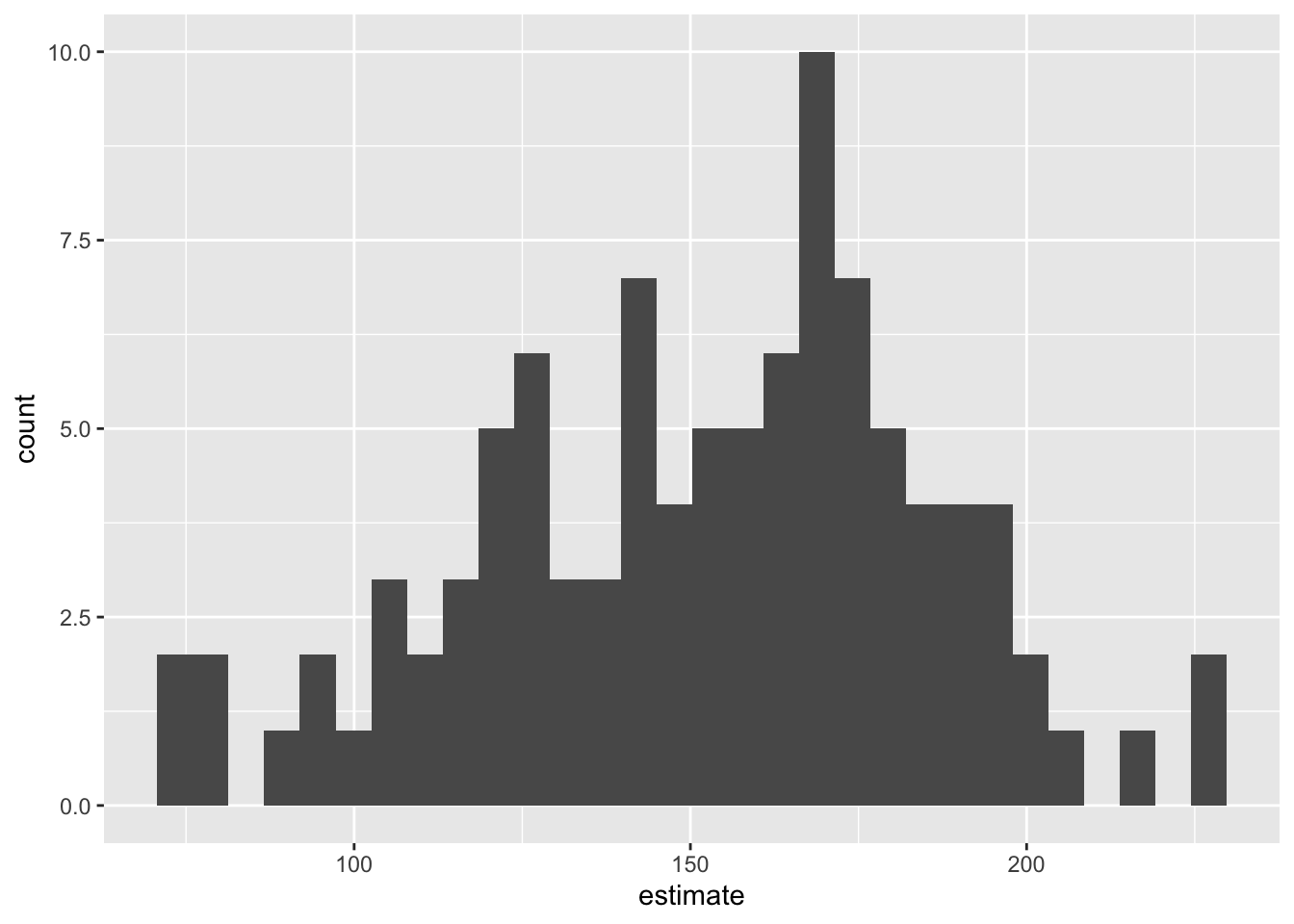
3. Compute the 95% confidence interval as the middle 95% of the bootstrap distribution
Fill in the code, then set eval: true .
get_confidence_interval(
  boot_fits,
  point_estimate = observed_fit,
  level = 0.95,
  type = "percentile"
)
# A tibble: 2 × 3
term lower_ci upper_ci
<chr> <dbl> <dbl>
1 area 78.3 212.
2 intercept -18861. 297587.Changing confidence level
Modify the code from Step 3 to create a 90% confidence interval.
get_confidence_interval(
  boot_fits,
  point_estimate = observed_fit,
  level = 0.90,
  type = "percentile"
)
# A tibble: 2 × 3
term lower_ci upper_ci
<chr> <dbl> <dbl>
1 area 94.9 198.
2 intercept 21288. 289304.Modify the code from Step 3 to create a 99% confidence interval.
get_confidence_interval(
  boot_fits,
  point_estimate = observed_fit,
  level = 0.99,
  type = "percentile"
)
# A tibble: 2 × 3
term lower_ci upper_ci
<chr> <dbl> <dbl>
1 area 73.9 227.
2 intercept -59585. 330014.Which confidence level produces the most accurate confidence interval (90%, 95%, 99%)? Explain
Which confidence level produces the most precise confidence interval (90%, 95%, 99%)? Explain
If we want to be very certain that we capture the population parameter, should we use a wider or a narrower interval? What drawbacks are associated with using a wider interval?